🤔 What is a Wireless Mouse?
A wireless mouse is a pointing device that connects to a computer or other host device without a physical cable. Instead of a wire, it uses radio frequency (RF) technology—most commonly via a tiny USB dongle or Bluetooth—to transmit cursor movements and button clicks. This untethered design eliminates cable drag, reduces desk clutter, and gives you the freedom to work or play from a comfortable distance.
Over the past two decades, wireless mice have evolved from laggy, battery‑hungry novelties into high‑performance peripherals that rival—and often surpass—their wired counterparts in speed, reliability, and features.
✨ Why Go Wireless? The Core Benefits
🧹 Clutter‑Free Desk Setup
Without a cable trailing across your desk, you reclaim valuable space and achieve a cleaner, more organized workspace. This is especially beneficial for minimalists, streamers, and anyone who uses a laptop on the go.
🏃 Unrestricted Movement
A wireless mouse allows you to operate from any angle—lean back in your chair, present from across the room, or use your computer from the couch. The absence of a cable means no tugging, no snagging, and no limited reach.
🎒 Portability
Most wireless mice are compact and designed to slip into a laptop bag alongside your computer. Paired with Bluetooth, you don’t even need to carry a dongle. This makes them the perfect travel companion for remote workers and students.
⚡ Modern Performance
Today’s wireless technology offers polling rates up to 1000 Hz (1 ms response) —indistinguishable from wired mice for the vast majority of users. Top esports players now compete with wireless mice, proving that lag is a thing of the past.
🔌 Types of Wireless Mice
The market offers several wireless technologies, each with its own strengths and ideal use cases.
| Type | Connection Method | Best For | Pros | Cons |
|---|---|---|---|---|
| 2.4 GHz USB Dongle | Dedicated RF receiver (nano dongle) | Gaming, office, low‑latency applications | Very low latency, plug‑and‑play, reliable | Occupies a USB port; dongle can be lost |
| Bluetooth | Built‑in Bluetooth radio | Laptops, multi‑device setups, travel | No dongle needed; connects to many devices (phones, tablets, Macs) | Slightly higher latency than 2.4 GHz; pairing sometimes required |
| Dual‑Mode (2.4 GHz + Bluetooth) | Switchable between dongle and BT | Professionals who use multiple computers | Ultimate flexibility; one mouse for desktop + laptop | Usually more expensive |
| Wi‑Fi / Wireless Charging | Uses Wi‑Fi or proprietary RF | High‑end productivity mice | Can work from extreme range (e.g., 10+ meters) | Rare; often expensive |
⚙️ Key Technologies Behind Wireless Mice
Understanding the inner workings helps you make an informed decision.
📡 Wireless Protocols
2.4 GHz RF: The most common technology for gaming and office mice. It uses a dedicated frequency band, avoiding interference from other Bluetooth devices. Dongle‑based mice typically offer 1000 Hz polling rate (1 ms response) and low power consumption.
Bluetooth 5.0 / 5.1 / 5.2: Modern Bluetooth standards provide improved range, lower latency, and better power efficiency. Bluetooth mice are ideal for multi‑device pairing (e.g., switch between laptop, tablet, and phone).
Proprietary Protocols: Brands like Logitech (Lightspeed), Razer (HyperSpeed), and Corsair (Slipstream) have developed their own low‑latency wireless technologies that achieve sub‑1 ms response times.
🖱️ Sensor Types
Optical LED Sensor: Uses an LED light to track surface movement. Reliable on most opaque surfaces, less battery‑hungry.
Laser Sensor: More precise on glossy or reflective surfaces. Often higher DPI (dots per inch), but may consume more power.
Infrared (IR) Sensor: A modern variant of optical; very efficient, used in many low‑power mice.
🔋 Power Sources
Replaceable Batteries (AA / AAA): Simple, cheap, and can last for months. Look for mice with an auto‑sleep feature to extend battery life.
Built‑in Rechargeable Battery (Li‑ion): Convenient—just plug in via USB‑C (or micro‑USB) to charge. Often includes fast‑charge capabilities (e.g., 1 minute charge for 3 hours of use).
Wireless Charging (Qi): Premium mice can be placed on a Qi charging pad (or a special mouse pad) for effortless topping up.
Solar / Ambient Light: Very rare, but some models (e.g., Logitech K750 keyboard companion) use ambient light to recharge.
🎛️ Polling Rate and DPI
Polling Rate: How often the mouse reports its position to the computer (Hz). Higher is smoother. Office: 125–250 Hz; Gaming: 500–1000 Hz.
DPI (Dots Per Inch): Sensitivity. Higher DPI means the cursor moves faster with less physical movement. Adjustable DPI switches let you toggle between low (precise) and high (fast) sensitivity.
🔑 Features to Look for in a Wireless Mouse
When shopping for a wireless mouse, consider these specifications to match your needs.
🔘 Number of Buttons and Programmability
Standard: Left, right, scroll wheel, middle click.
Extra Buttons: Forward/back thumb buttons (for web browsing), DPI shift button, programmable side buttons.
Software Support: Logitech Options+, Razer Synapse, SteelSeries GG allow you to remap buttons, assign macros, and adjust sensitivity profiles.
🧲 Silent or Quiet Clicks
For shared workspaces, libraries, or late‑night use, look for mice labeled “silent” or “quiet click.” These use dampened micro‑switches that reduce audible click noise by 90% or more.
🖐️ Ergonomics and Size
Ambidextrous vs. Right‑handed: Choose based on your dominant hand.
Size: Small (travel, small hands), medium (most users), large (palm grip, larger hands).
Grip Style: Palm grip (whole hand rests), claw grip (fingers arched), fingertip grip (only fingertips touch). Ensure the mouse shape matches your natural grip.
📦 Portability and Storage
Nano Dongle Storage: A compartment inside the mouse (or under the battery cover) to store the USB dongle when traveling—prevents loss.
Flat / Collapsible Design: Some travel mice flatten to the thickness of a credit card.
💡 Extra Convenience Features
Multi‑Device Pairing: Switch between up to 3 devices with a button (e.g., desktop, laptop, tablet).
Flow / Cross‑Computer Control: Logitech Flow allows you to move the cursor between computers (even copy/paste files).
On‑Mouse DPI Indicator: LED light or display shows current sensitivity.
Scrolling Modes: Free‑spinning (hyper‑fast) vs. ratcheted (precise) scroll wheel.
🧐 How to Choose the Right Wireless Mouse for You
| Scenario | Recommended Type | Key Feature to Prioritize | Why |
|---|---|---|---|
| Office / Productivity | 2.4 GHz or dual‑mode | Comfortable ergonomics, silent clicks, multi‑device pairing | Long hours; need comfort and efficiency. |
| Gaming (casual to competitive) | 2.4 GHz with 1000 Hz polling | Low latency (≤1 ms), high DPI range, lightweight | Responsiveness matters; extra buttons for macros. |
| Travel / Laptop | Bluetooth or compact 2.4 GHz | Portability, dongle storage, long battery life | Avoids dongle loss; fits in a small bag. |
| Home / Media PC | 2.4 GHz with long range | Long battery life, quiet clicks, media keys | Used from a couch; easy on‑screen navigation. |
| Design / CAD | High‑DPI (≥4000) laser or optical | Precise tracking on various surfaces, programmable buttons | Needs fine cursor control and macros. |
| Shared / Multi‑user | Bluetooth with multi‑device | Fast device switching, durable build | One mouse for many computers. |
🛠️ Battery Life and Power Management
Battery life varies widely—from a few days to several years (with a single AA battery). Here’s what to expect:
| Power Type | Typical Battery Life | Notes |
|---|---|---|
| AA / AAA alkaline | 6–24 months (office) | Logitech’s “Ultra‑long‑life” mice (e.g., M720) can last 2 years. |
| AA / AAA lithium | 12–36 months | Better cold‑weather performance, lighter weight. |
| Rechargeable Li‑ion | 20–150 hours (gaming); 1–3 months (office) | Gaming mice often last 50‑70 hours per charge. |
| Qi wireless charging | Varies (same as Li‑ion) | Convenient but requires charging pad. |
Pro Tips:
Turn off the mouse when not in use (if no auto‑sleep).
Use a high‑quality battery or rechargeable NiMH (e.g., Eneloop) for AA/AA models.
For gaming mice, keep the charging cable nearby—many can be used while charging (wired mode).
🧼 Maintenance and Care
Clean the Sensor Lens: Dust can cause erratic cursor movement. Gently blow or use a cotton swab.
Clean the Scroll Wheel and Buttons: Use compressed air or a soft brush to remove debris.
Replace Feet (Skates): Mouse feet wear over time. Replace them when movement feels scratchy.
Store with Dongle: Always place the USB dongle in the storage compartment when traveling.
Update Firmware: Check manufacturer’s software for firmware updates that improve performance or battery life.
💡 Top Wireless Mouse Examples (Popular Models)
| Model | Type | Key Features | Sensor | Battery Life | Best For |
|---|---|---|---|---|---|
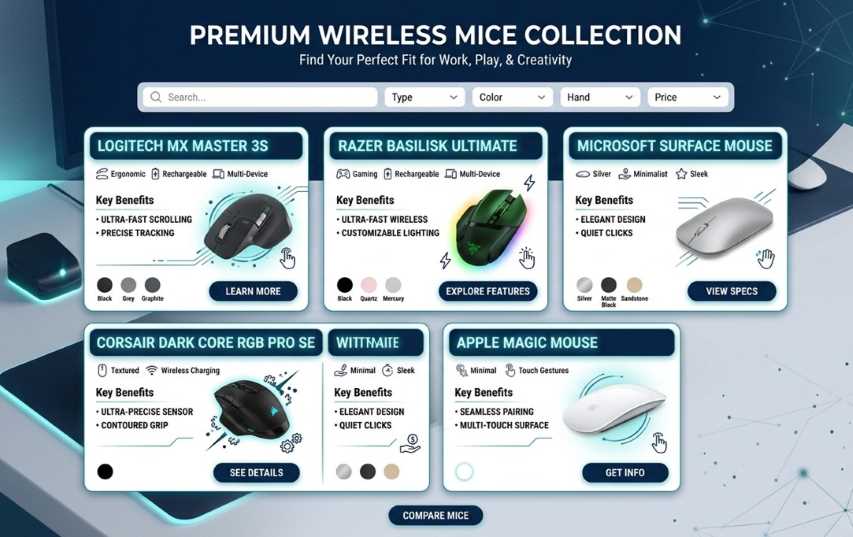
| Logitech MX Master 3S | Dual‑mode (BT + 2.4 GHz) | MagSpeed wheel, silent clicks, 8K DPI, flow, USB‑C | Darkfield laser | 70 days | Productivity, design, multi‑device |
| Logitech G502 X Lightspeed | 2.4 GHz gaming | 25K DPI, 13 programmable buttons, optical switches | Hero 25K | 140 hours (RGB off) | Gaming, programmable macros |
| Razer DeathAdder V2 Pro | 2.4 GHz + BT | Focus+ 20K DPI, optical switches, 5 buttons | Focus+ optical | 120 hours | Esports, palm grip gamers |
| Microsoft Modern Mobile Mouse | Bluetooth | Slim design, metal scroll wheel, 3 buttons | Optical | 12 months (AA) | Travel, minimalists, laptop users |
| Logitech M720 Triathlon | Dual‑mode | 6 programmable buttons, hyper‑fast scroll, multi‑device | Optical | 24 months (AA) | Office, multi‑computer work |
| Apple Magic Mouse 2 | Bluetooth | Multi‑Touch surface, rechargeable, sleek | Laser | ~1 month | Mac users, gestures |
| Razer Orochi V2 | Dual‑mode | 18K DPI, 6 buttons, 2.4 GHz + BT, AA/AAA | Optical | 950 hours (BT) | Travel, small hands, hybrid use |
🏁 Wireless Freedom is Here to Stay
The wireless mouse has matured into a reliable, high‑performance tool that suits everyone from casual users to competitive gamers. With advancements in battery life, sensor accuracy, and connection stability, the old compromises are gone. You no longer need to sacrifice speed for convenience.
When choosing your wireless mouse, prioritize your primary use case—productivity, gaming, travel, or design—then match the technology (2.4 GHz, Bluetooth, or dual‑mode), ergonomics, and battery type to your lifestyle. The result will be a clutter‑free, comfortable, and liberating computing experience.
Cut the cord, and never look back.