Reimagining the Morning Ritual
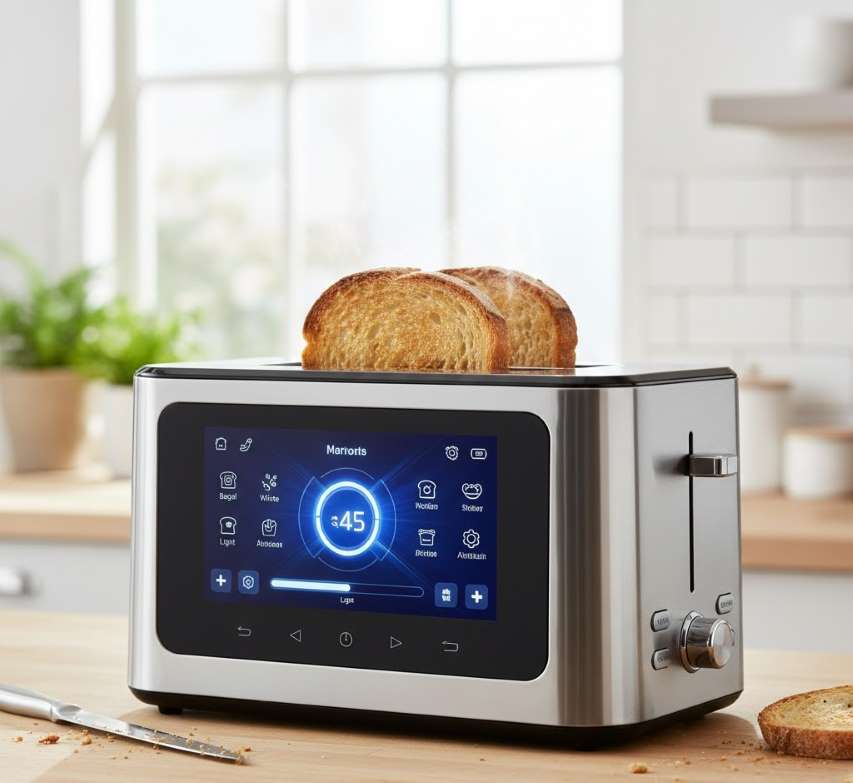
The Touchscreen Toaster represents a fundamental rethinking of one of the kitchen's most humble yet essential appliances. For decades, toasters have operated on a simple but flawed premise: a mechanical timer, a dial of ambiguous numbers, and blind faith that the result would match expectation. The touchscreen toaster replaces this guesswork with visual precision, intelligent presets, and an interactive interface that transforms toasting from a gamble into a science. Far from a frivolous gadget, this emerging category of smart appliance addresses the universal frustration of inconsistent toast with genuinely useful technology.
Core Technology: How Touchscreen Toasters Work
Unlike traditional toasters that rely on analog timers and bimetallic strips, touchscreen toasters integrate several layers of modern technology.
The Interface Layer
The defining feature is a full-color LCD or LED touchscreen display, typically spanning the front facade of the appliance. This is not merely a set of capacitive touch buttons masquerading as a screen; premium models employ the same type of high-definition, full-color display technology found on laptops and smartphones. This screen serves as both control panel and feedback center, displaying available settings, visual previews of toast doneness, and real-time countdown timers.
The Intelligence Layer
Beneath the interface lies software-driven logic. When a user selects "sourdough" and "level 4," the toaster's microcontroller references preprogrammed profiles that adjust heating time and temperature specifically for that bread's density and moisture content. This is not a fixed timer; it is an adaptive algorithm.
The Heating Layer
Most touchscreen toasters utilize powerful, evenly distributed heating elements (typically 850W to 1400W) designed to deliver consistent browning from edge to center. Some advanced models, such as the Revolution R180 Connect, employ proprietary systems like InstaGLO 2.0, which heat rapidly to sear the bread's surface, locking in moisture and preventing the dryness commonly associated with traditional toasting.
Key Features & Interface Components
Modern touchscreen toasters offer a remarkably deep feature set, organized through intuitive graphical interfaces.
| Feature Category | Specific Functions | User Benefit |
|---|---|---|
| Browning Control | 6-8 precision levels, often displayed as visual images of toast from light blonde to deep amber. | Eliminates the ambiguity of numbered dials; you see exactly what you will get. |
| Food/Bread Presets | Ranges from 5 to 10+ options including: white, wheat, multigrain, sourdough, gluten-free, bagel, English muffin, waffle, pastry, brioche, pita. | Automatically optimizes time and temperature for specific items. |
| Specialized Modes | Defrost (for frozen items), Reheat (warms without additional browning), Single-Slice (heats only one slot), +10/+15/+30 second boost . | Provides granular control and energy efficiency. |
| Bagel Mode | Toasts the cut side while gently warming the outer crust; also optimized for English muffins. | Delivers the ideal bagel texture—crisp interior, soft exterior. |
| Countdown Timer | Digital display shows remaining seconds; no more listening for the "pop”. | Perfect for coordinating toast with coffee or eggs. |
| Quick View / High-Lift | Raises bread mid-cycle to check progress without canceling or risking burns. | Eliminates the "pop and peek" gamble. |
| Memory Function | Saves your most-used setting (e.g., "Bagel + Level 4") for one-tap recall. | Streamlines the morning routine. |
| Smart Connectivity | Wi-Fi/Bluetooth enables weather display, photo screensavers, app notifications, and over-the-air updates (premium models). | Transforms the toaster into a connected information hub. |
The Touchscreen Experience: Beyond Buttons
The distinction between a "digital toaster" and a true "touchscreen toaster" is critical. Some appliances feature small LED numeric displays with tactile buttons; these are digital but not genuinely touchscreen. True touchscreen toasters offer:
Graphical Selection: Users tap icons of bagels, waffles, or bread slices directly on the screen.
Slider Controls: Doneness is selected by dragging a finger across a gradient bar, with the toast image darkening in real-time.
Visual Feedback: The screen confirms your selection with animated graphics and displays the precise countdown.
Swipe Navigation: Menus are organized into carousels; swiping left or right browses bread types.
The Kalorik Vivid Touch exemplifies this paradigm. Upon power-up, it displays a home screen with the current time. Tapping reveals a main menu where users swipe through a carousel of bread options, select fresh/frozen/reheat mode, and drag a doneness slider. The software calculates the exact heating profile. This is fundamentally different from pressing numbered buttons.
Critical Insight: Testing by Popular Mechanics compared the Kalorik Vivid Touch (smart) against a Cuisinart digital model (traditional-style controls). Both produced comparably even, consistent toast. The difference was not in outcome quality but in user experience. The smart toaster required no guesswork; settings were automatically configured. The traditional model required manual adjustment and occasional use of the "+30 seconds" button. For users who value simplicity and certainty, this distinction is profound.
Are They Worth It? A Balanced Assessment
Strong Arguments For
You value precision: If you are particular about your toast and frustrated by inconsistency, the visual feedback and presets are genuinely liberating.
You toast diverse items: Households that rotate between bagels, frozen waffles, thick sourdough, and English muffins benefit enormously from one-touch optimization.
You appreciate modern aesthetics: Touchscreen toasters are undeniably sleek, adding a contemporary focal point to the countertop .
You have specific dietary needs: Gluten-free bread toasts differently; dedicated presets prevent burning or undercooking .
Considerations & Caveats
Cost premium: Even budget touchscreen models cost 2-3× more than a basic functional toaster.
Durability questions: Some customer reviews for mid-tier brands (Mecity, Dear Morning) note that build quality does not always match the premium feel of the interface.
Uneven heating reports: A Kalorik user observed that certain darkness settings produced less even browning, suggesting that software optimization is not yet perfect across all brands.
Complexity for minimalists: If you view toasters as purely utilitarian, the additional steps (swiping, selecting) may feel like overkill.
Maintenance & Care
Touchscreen toasters are generally simple to maintain, with design improvements over traditional models.
Exterior Cleaning: The stainless-steel housing and glass-covered touchscreen wipe clean with a damp, soft cloth. Avoid abrasive cleaners that can scratch the display.
Crumb Tray: Nearly all models feature a slide-out, removable crumb tray at the base. Empty regularly to prevent smoke and fire risk.
Anti-Jam Protection: Many units include an anti-jam function that prevents operation if food is lodged, enhancing safety.
Storage: When not in use, the sleek design allows it to remain on the counter as a permanent fixture.
The Future: From Novelty to Necessity?
The touchscreen toaster has rapidly evolved from a conceptual curiosity (such as the 2012 "Hue" prototype, which used color sensors to match toast to a selected shade) to a commercially viable, affordable reality. With Cuisinart's SimpliTouch XL proving that full color touchscreens can be mass-produced at $59.99, the barrier to entry has effectively dissolved.
The question is no longer whether touchscreen toasters are real, but whether they are right for you. For the toast enthusiast, the busy parent juggling morning routines, or the remote worker seeking a moment of predictable perfection, the answer is increasingly clear. This is not technology for technology's sake. It is technology applied to a mundane task with genuine empathy for the user's experience.
Precision Meets Breakfast
The Touchscreen Toaster represents a mature, thoughtful evolution of a century-old appliance. It does not reinvent toast; it perfects the process of achieving it. By replacing ambiguity with imagery, guesswork with algorithms, and hope with certainty, it delivers on the promise that smart kitchen technology should be genuinely useful. Whether you choose the value-oriented simplicity of the Cuisinart SimpliTouch, the high-speed innovation of the Revolution R180, or the family-friendly capacity of a dual-touchscreen Mecity, you are investing in a tool that respects both your food and your time. In an era of over-engineered gadgets, the touchscreen toaster stands out as a rare example of complexity applied in service of simplicity
 |  |  |
 |  |  |